
How to Make a Burning Bridges AI Video 2026: Your Photo, the Party, the Moves
Prepare an appearance reference, understand the party prompt, plan the action sequence and check your complete Burning Bridges AI video before sharing.
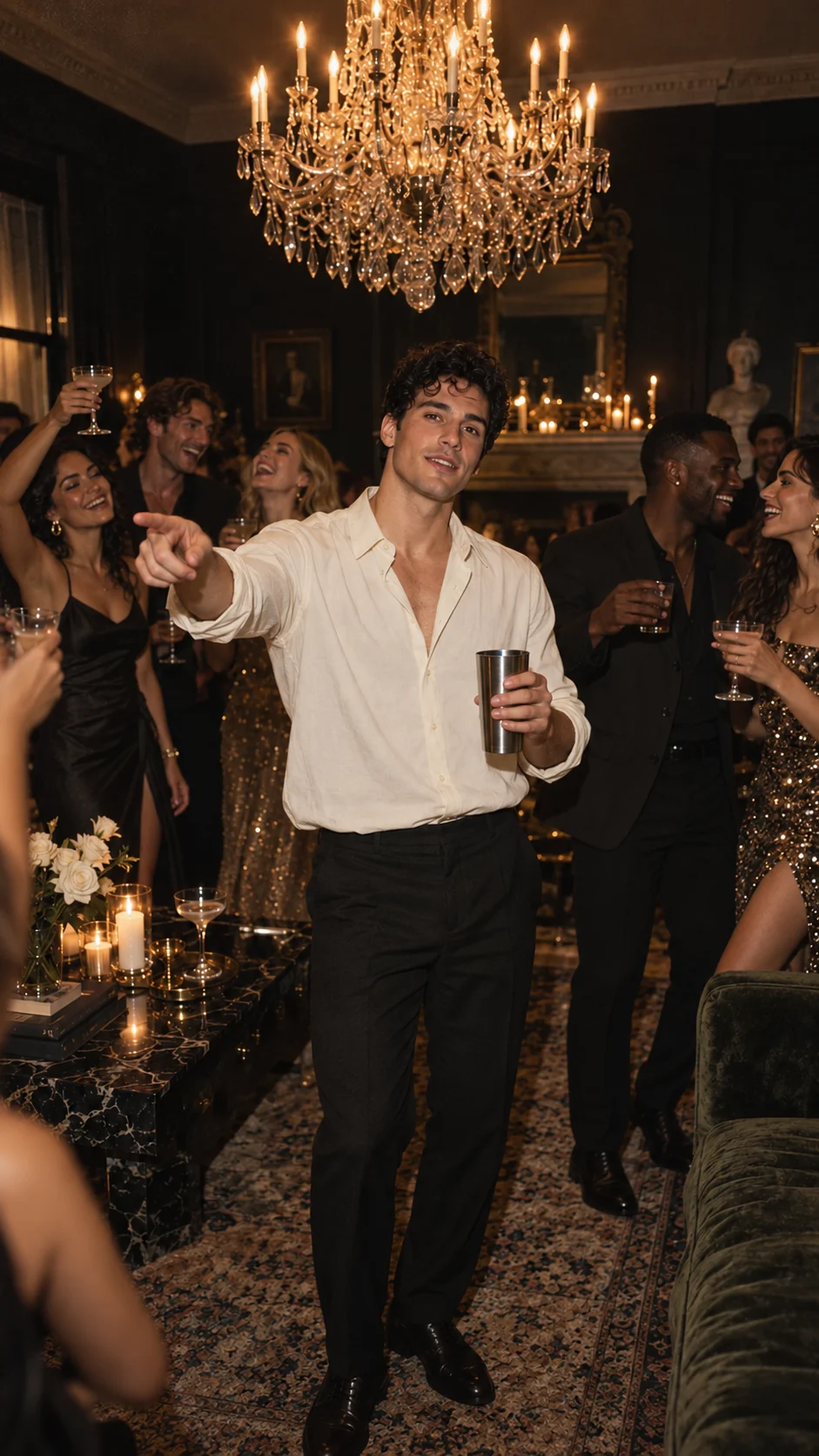
Quick answer: Burning Bridges AI is designed to generate a new party video from a prepared prompt. A clear adult portrait supplies an appearance reference, while the prompt describes the scene, actions and camera movement. The template prepares the prompt and technical settings for you. The H3 workflow generates 20 seconds at native 768P, delivered as 720 × 1280 portrait video. A public generated sample is available to watch. Generation requires an existing video entitlement; new accounts start with zero entitlements, and purchases are closed. Actions may vary from the reference.
Burning Bridges AI does not offer AI face swapping or face replacement in existing videos. Uploaded photos serve only as appearance references for newly generated scenes.
What You Get
The creative brief describes an original party performance: pointing into the crowd, a hand and open cup near the lens, chest-level movement, a side turn toward neighboring guests, then a palm and cup beside the face. Camera movement is described in the prompt alongside the actions.
The H3 workflow produces a 20-second video at native 768P and delivers a 720 × 1280 portrait download. The public sample uses an AI-created fictional adult and includes native audio. It is an example of generated party footage: its timing, gestures and framing vary from the reference. Review every new result for appearance continuity, hands, sound and a usable ending.
What the Trend Actually Is
Burning Bridges is a track on Drake's 2026 ICEMAN album. Universal Music announced the album release on May 15. The phrase associated with the trend is “Where she at?”. Its party-video adaptations include a longer sequence of cup, chest, side-turn and face-level hand movements, rather than only a hand shading the eyes. Billboard Canada also documented Drake performing that gesture on a World Cup stadium screen.
Creators adapt the idea in different ways. Our approach uses a written prompt to generate a fresh party scene, with an uploaded image guiding appearance. A motion reference also guides the model, but the generated actions can differ from it. The official recording is not bundled. Read the trend and audio guide for the context.
Pets Welcome
A pet version should be recognizably your animal: the same ears, coat pattern, muzzle and collar through motion. Pet generation is not open in the current adult-only workflow. An upright cup-and-paw performance needs a different review from natural four-legged movement. Neither direction has an accepted pet result on this site. Treat it as a separate effect to review, especially around the paws and mouth. Our pet guide covers source-photo preparation.
The Fastest Way
The focused template interface asks for one adult portrait as an appearance reference and prepares the generation prompt. Separate subject, pet and party-look choices are not currently offered. The brief stays consistent and you do not have to write a prompt or manage model parameters yourself.
For every result, review the prompted actions, cup continuity, expressive mouth movement, camera changes, recognizable appearance, usable sound and downloaded file. A generated sample does not guarantee these details in a different output. Planned one-time packs are $9.90/1, $19.90/3 and $29.90/5. The per-video prices are $9.90, approximately $6.63 and $5.98. Checkout is closed; pricing shows the current availability.
Build It Yourself
For a DIY version, write the scene and movement into the prompt. A plain request to “dance at a party” leaves the sequence open. If the model accepts an image, use it to explain appearance and composition, then describe what should happen over time.
- Prepare an appearance reference. Choose a clear adult portrait you may use. The image gives the AI information about the subject's appearance; the written prompt describes the new scene and movement.
- Define the original party scene. Describe a warm chandelier party, the lead's position, the background crowd and the intended framing. Keep the scene readable and leave room for gestures near the camera.
- Write a timed beat list. Describe the desired pointing, hand and cup gestures, chest movement, side turn and ending in order. Include camera movement and keep the timing realistic for the intended clip length.
- Generate from the prompt and review. Use a video model that supports your written brief and optional appearance reference. Generate the new clip, review the full image and audio, then download a usable result. On this site, H3 generation requires sign-in and an existing video entitlement; new accounts start with zero entitlements and purchases are closed.
Choose a model and provider that support the required prompt, image input, duration and framing. Verify those limits in the provider's documentation before generating.
Here is a 20-second prompt-planning checklist for an original party sequence. It is a starting brief, not a tested production prompt or a promise of exact choreography:
| Interval | Visible action to request | Check at the end |
|---|---|---|
| 0–2 seconds | Point outward within an active crowd | Cup in the specified hand; wider framing |
| 2–5 seconds | Move close with a hand gesture and raised cup | Foreground hand and cup stay distinct |
| 5–10 seconds | Forearm across chest, collar movement and sway | Outfit and prop unchanged |
| 10–15 seconds | Turn sideways and extend toward nearby guests | Camera tracks the side interaction |
| 15–16 seconds | Reach a hand close to the lens | Correct hand perspective and face recovery |
| 16–20 seconds | Raise palm and cup beside the face, then open | Identity survives brief face occlusion |
Write the roles explicitly: “Use the uploaded portrait as the lead's appearance reference. Generate a new warm chandelier-party scene. Follow the written action sequence and camera directions. Keep the open cup in the same hand throughout and finish with a clear final pose.” This is a starting brief; it does not establish likeness or motion accuracy.
Common Mistakes
- Leaving the image's role unclear. Use the portrait to explain appearance, then describe the new scene and movement in the prompt.
- Leaving out the timed actions. Generic dancing can miss the intended gestures. Describe the beats and inspect the complete generated sequence and camera changes.
- Ignoring face occlusion. A hand and cup near the face can make continuity harder. Review whether the subject stays recognizable after each overlap.
- Forgetting prop ownership. Specify one hand and keep it consistent. Watch for hand changes, extra fingers or a closed shaker replacing an open cup, or a prop merging into the face.
Return to the home generator, compare the template brief, or improve your input using the photo guide.
Frequently asked questions
- How many photos do I need?
- The current workflow asks for one clear adult portrait as an appearance reference. The AI generates a new video from the template's prepared prompt. Pet mode is not open. A waist-up portrait gives the model more appearance information than a tiny face in a group shot.
- Can I generate the video on this site today?
- Generation requires sign-in and an existing video entitlement. New accounts receive zero free entitlements, and checkout is currently closed. You can watch the public generated sample without generating.
- Is the output already verified as 20 seconds and 9:16?
- The completed public H3 sample has a 20-second, 720 × 1280 portrait download, generated at native 768P. Its actions and camera movement vary from the reference; this example does not guarantee exact choreography or identical results from other photos.
- Does the template include Drake's recording?
- No. The original recording is not bundled. The public H3 sample includes native AI audio, which does not promise the original song, an artist voice or synchronized lyrics. Add only a sound you are entitled to use under your publishing platform’s terms.
- Can I change the people behind me?
- Individual background-person uploads are not currently offered. The recipe requests a generated supporting crowd, rather than a cast of your friends from separate photos.
- What are the planned prices?
- The planned one-time packs are $9.90 for one video, $19.90 for three ($6.63 each rounded) and $29.90 for five ($5.98 each). Purchase remains disabled.